ActiCal Support
Please contact Sales for general questions about ActiCal. If you’re already an ActiCal customer the fastest and best way to contact us is by creating a support ticket in ActiCal Dashboard.
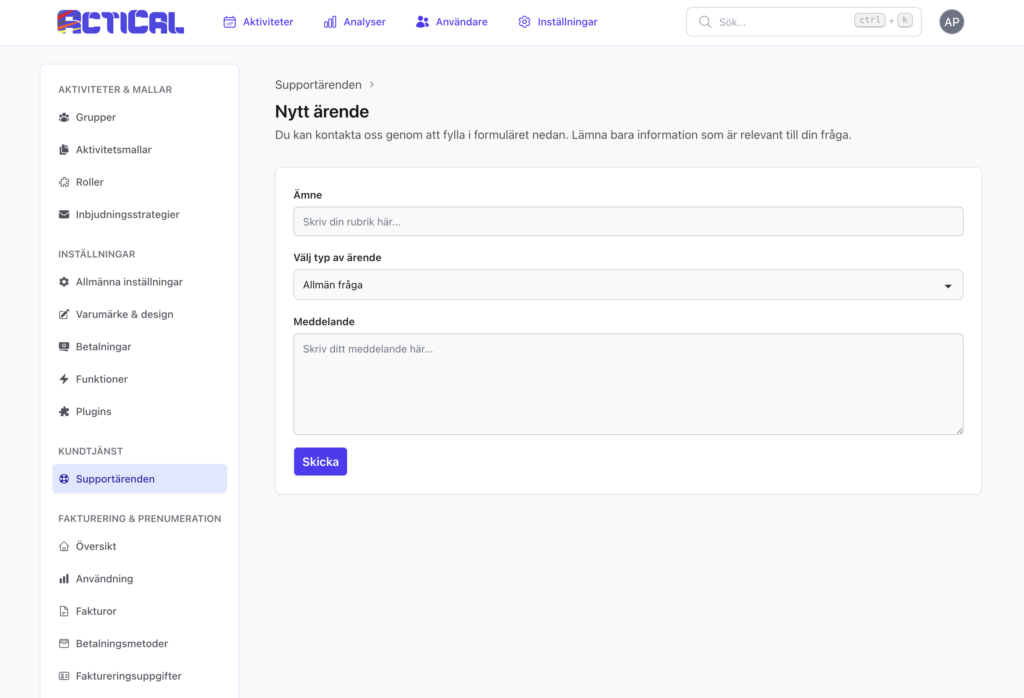
Fastest Way to Get Help:
Create a Support Ticket in Your ActiCal Dashboard
If you’re already logged into ActiCal, the quickest and most direct way to reach our support team for technical issues, account questions, or product functionality is by submitting a ticket right inside the platform — no email required!
How to create a support ticket:
- Log in to your ActiCal account at dashboard.actical.eu.
- Navigate to the Dashboard, visit Settings and go to “Customer support” in the menu on the left-hand side.
- Press the button New Ticket.
- Fill in the details of your issue – and submit. Our team typically responds within 24 business hours, often faster for dashboard-submitted tickets.
This routes your request straight to the right person with full context from your account.
Who should you contact?
We’ll help you figure it out.
Contact ActiCal Sales & Account Manager for:
- Account related questions
- Technical issues
- General questions about ActiCal functionality
Contact the organization that is using ActiCal for:
- Questions related to the activities in ActiCal Calendar
- Invitations to Calendars
- General questions on membership fees, etc.
For questions like these, please instead contact the organization that is using ActiCal.